
? 当设备"哑巴"了,你怎么办?
车间里有台注塑机,昨天还好好的,今天一早就停了。操作工说"不知道啥时候停的",班组长说"我没收到报警",工程师打开电脑——Excel表格,上次更新是三天前。
这个场景,做工控软件的朋友应该不陌生。
设备状态监控,听起来是个"小需求",实际上坑深得很。数据怎么存?历史怎么查?报警怎么触发?界面怎么刷新不卡顿?每一个问题单独拎出来都不简单,凑在一起更是让人头大。
本文就从一个真实的生产线监控项目出发,聊聊用CustomTkinter + SQLite搭建设备状态监控系统时,数据库这块该怎么设计——不是照搬教科书,是实际踩过坑之后的经验总结。
? 为什么选SQLite,而不是MySQL?
先把这个问题说清楚,不然后面的设计决策没法理解。
工厂现场的监控软件,有几个特点:单机部署为主、数据量中等(不是互联网那种亿级)、离线可用、运维人员技术水平参差不齐。
MySQL当然强,但你得装服务、配权限、维护连接池——出了问题,现场工程师大概率搞不定。SQLite呢?一个.db文件,拷贝走就是备份,零配置,嵌进Python程序里开箱即用。对于单台工控机跑的监控软件,它绰绰有余。
当然,SQLite也有局限:高并发写入会锁表,不适合多进程同时写。但在我们这个场景里——一个主进程采集数据、一个UI线程展示——完全没问题,后面会专门处理线程安全的问题。
? 数据库表结构设计
好的表结构是整个系统的地基。这里我设计了四张核心表,每张表的存在都有明确理由。
?️ 设备基础信息表
sql1CREATE TABLE IF NOT EXISTS devices (
2    device_id    TEXT PRIMARY KEY,   -- 设备唯一编号,如 "INJ-001"
3    device_name  TEXT NOT NULL,      -- 设备名称
4    device_type  TEXT NOT NULL,      -- 类型:注塑机/传送带/检测仪
5    location     TEXT,               -- 产线位置,如 "A线-3号位"
6    install_date TEXT,               -- 安装日期
7    is_active    INTEGER DEFAULT 1   -- 是否启用(1=是,0=否)
8);这张表基本上是静态数据,设备上线时录入,几乎不改。device_id用有意义的字符串而不是自增整数——原因很简单,现场沟通时"INJ-001停了"比"设备ID=7停了"直观多了。
? 实时状态表
sql1CREATE TABLE IF NOT EXISTS device_status (
2    id           INTEGER PRIMARY KEY AUTOINCREMENT,
3    device_id    TEXT NOT NULL,
4    status       TEXT NOT NULL,      -- running/stopped/warning/error
5    temperature  REAL,               -- 温度(℃)
6    pressure     REAL,               -- 压力(MPa)
7    speed        REAL,               -- 转速(rpm)
8    timestamp    TEXT NOT NULL,      -- ISO格式时间戳
9FOREIGN KEY (device_id) REFERENCES devices(device_id)
10);
11
12-- 查询性能关键:时间戳和设备ID的联合索引
13CREATE INDEX IF NOT EXISTS idx_status_device_time
14ON device_status(device_id, timestamp DESC);注意这里的timestamp用TEXT存ISO格式字符串(2026-04-02T09:23:45),不用DATETIME类型。为啥?SQLite的DATETIME支持其实很弱,用字符串反而更灵活,而且ISO格式字符串排序和时间排序完全一致,查"最近1小时数据"用字符串比较就行,不需要额外转换。
? 报警记录表
sql1CREATE TABLE IF NOT EXISTS alarms (
2    alarm_id     INTEGER PRIMARY KEY AUTOINCREMENT,
3    device_id    TEXT NOT NULL,
4    alarm_type   TEXT NOT NULL,      -- overheat/pressure_high/comm_lost 等
5    alarm_level  TEXT NOT NULL,      -- info/warning/critical
6    message      TEXT,               -- 报警描述
7    trigger_time TEXT NOT NULL,      -- 触发时间
8    ack_time     TEXT,               -- 确认时间(NULL=未确认)
9    ack_user     TEXT,               -- 确认人
10FOREIGN KEY (device_id) REFERENCES devices(device_id)
11);ack_time为NULL就代表报警未处理——这个设计比单独加个status字段更简洁,查"未确认报警"直接WHERE ack_time IS NULL,一目了然。
? 日统计汇总表
sql1CREATE TABLE IF NOT EXISTS daily_stats (
2    stat_id         INTEGER PRIMARY KEY AUTOINCREMENT,
3    device_id       TEXT NOT NULL,
4    stat_date       TEXT NOT NULL,   -- 日期,格式 "2026-04-02"
5    running_minutes INTEGER DEFAULT 0,
6    stop_count      INTEGER DEFAULT 0,
7    alarm_count     INTEGER DEFAULT 0,
8    avg_temperature REAL,
9    max_temperature REAL,
10UNIQUE(device_id, stat_date)     -- 每台设备每天只有一条记录
11);这张表是个"预计算缓存"。历史数据查询,尤其是"上个月各设备运行率"这种报表,如果每次都扫device_status的原始数据,数据量一大就很慢。提前汇总到这张表,查报表时直接读,快得多。
? 数据库操作封装
表结构设计完,接下来是Python代码层面的封装。这里最关键的一个问题:线程安全。
CustomTkinter的UI跑在主线程,数据采集通常在后台线程,两个线程同时操作SQLite,不处理好就会碰到ProgrammingError: SQLite objects created in a thread can only be used in that same thread这个经典报错。
解决方案有几种,我倾向于用连接池 + 线程本地存储的方式:
python1import sqlite3
2import threading
3import logging
4from datetime import datetime
5from contextlib import contextmanager
6from typing import Optional, List, Dict, Any
7
8logger = logging.getLogger(__name__)
9
10class DeviceDatabase:
11"""
12    设备状态数据库管理类
13    使用线程本地连接,确保多线程安全
14    """
15
16def __init__(self, db_path: str = "device_monitor.db"):
17        self.db_path = db_path
18        self._local = threading.local()  # 每个线程独立的连接
19        self._init_database()
20
21def _get_connection(self) -> sqlite3.Connection:
22"""获取当前线程的数据库连接(没有则创建)"""
23if not hasattr(self._local, 'conn') or self._local.conn is None:
24            self._local.conn = sqlite3.connect(
25                self.db_path,
26                timeout=10,           # 等锁超时10秒
27                check_same_thread=False
28            )
29            self._local.conn.row_factory = sqlite3.Row  # 结果可按列名访问
30# 开启WAL模式,读写并发性能更好
31            self._local.conn.execute("PRAGMA journal_mode=WAL")
32            self._local.conn.execute("PRAGMA synchronous=NORMAL")
33return self._local.conn
34
35@contextmanager
36def get_cursor(self):
37"""上下文管理器,自动处理事务提交和回滚"""
38        conn = self._get_connection()
39        cursor = conn.cursor()
40try:
41yield cursor
42            conn.commit()
43except Exception as e:
44            conn.rollback()
45            logger.error(f"数据库操作失败,已回滚: {e}")
46raise
47finally:
48            cursor.close()
49
50def _init_database(self):
51"""初始化数据库,创建所有表"""
52with self.get_cursor() as cursor:
53            cursor.executescript("""
54                CREATE TABLE IF NOT EXISTS devices (
55                    device_id    TEXT PRIMARY KEY,
56                    device_name  TEXT NOT NULL,
57                    device_type  TEXT NOT NULL,
58                    location     TEXT,
59                    install_date TEXT,
60                    is_active    INTEGER DEFAULT 1
61                );
62
63                CREATE TABLE IF NOT EXISTS device_status (
64                    id           INTEGER PRIMARY KEY AUTOINCREMENT,
65                    device_id    TEXT NOT NULL,
66                    status       TEXT NOT NULL,
67                    temperature  REAL,
68                    pressure     REAL,
69                    speed        REAL,
70                    timestamp    TEXT NOT NULL,
71                    FOREIGN KEY (device_id) REFERENCES devices(device_id)
72                );
73
74                CREATE INDEX IF NOT EXISTS idx_status_device_time
75                    ON device_status(device_id, timestamp DESC);
76
77                CREATE TABLE IF NOT EXISTS alarms (
78                    alarm_id     INTEGER PRIMARY KEY AUTOINCREMENT,
79                    device_id    TEXT NOT NULL,
80                    alarm_type   TEXT NOT NULL,
81                    alarm_level  TEXT NOT NULL,
82                    message      TEXT,
83                    trigger_time TEXT NOT NULL,
84                    ack_time     TEXT,
85                    ack_user     TEXT,
86                    FOREIGN KEY (device_id) REFERENCES devices(device_id)
87                );
88
89                CREATE TABLE IF NOT EXISTS daily_stats (
90                    stat_id         INTEGER PRIMARY KEY AUTOINCREMENT,
91                    device_id       TEXT NOT NULL,
92                    stat_date       TEXT NOT NULL,
93                    running_minutes INTEGER DEFAULT 0,
94                    stop_count      INTEGER DEFAULT 0,
95                    alarm_count     INTEGER DEFAULT 0,
96                    avg_temperature REAL,
97                    max_temperature REAL,
98                    UNIQUE(device_id, stat_date)
99                );
100            """)
101        logger.info(f"数据库初始化完成: {self.db_path}")
PRAGMA journal_mode=WAL这行值得单独说一下。WAL(Write-Ahead Logging)模式下,读操作不会阻塞写操作——UI线程查历史数据的同时,采集线程可以继续写入,互不干扰。对于我们这种"频繁写入、偶尔查询"的场景,开启WAL是个必要操作。
? 核心业务操作实现
有了基础封装,再实现几个高频操作:
python1# ---- 写入操作 ----
2
3def insert_status(self, device_id: str, status: str,
4                  temperature: float = None,
5                  pressure: float = None,
6                  speed: float = None) -> bool:
7"""写入一条设备状态记录"""
8    timestamp = datetime.now().strftime("%Y-%m-%dT%H:%M:%S")
9try:
10with self.get_cursor() as cursor:
11            cursor.execute("""
12                INSERT INTO device_status
13                    (device_id, status, temperature, pressure, speed, timestamp)
14                VALUES (?, ?, ?, ?, ?, ?)
15            """, (device_id, status, temperature, pressure, speed, timestamp))
16return True
17except Exception as e:
18        logger.error(f"写入状态失败 [{device_id}]: {e}")
19return False
20
21def trigger_alarm(self, device_id: str, alarm_type: str,
22                  level: str, message: str) -> Optional[int]:
23"""触发一条报警记录,返回alarm_id"""
24    trigger_time = datetime.now().strftime("%Y-%m-%dT%H:%M:%S")
25try:
26with self.get_cursor() as cursor:
27            cursor.execute("""
28                INSERT INTO alarms
29                    (device_id, alarm_type, alarm_level, message, trigger_time)
30                VALUES (?, ?, ?, ?, ?)
31            """, (device_id, alarm_type, level, message, trigger_time))
32return cursor.lastrowid
33except Exception as e:
34        logger.error(f"触发报警失败 [{device_id}]: {e}")
35return None
36
37def acknowledge_alarm(self, alarm_id: int, user: str) -> bool:
38"""确认报警"""
39    ack_time = datetime.now().strftime("%Y-%m-%dT%H:%M:%S")
40try:
41with self.get_cursor() as cursor:
42            cursor.execute("""
43                UPDATE alarms
44                SET ack_time = ?, ack_user = ?
45                WHERE alarm_id = ? AND ack_time IS NULL
46            """, (ack_time, user, alarm_id))
47return cursor.rowcount > 0
48except Exception as e:
49        logger.error(f"确认报警失败 [alarm_id={alarm_id}]: {e}")
50return False
51
52# ---- 查询操作 ----
53
54def get_latest_status(self, device_id: str) -> Optional[Dict]:
55"""获取设备最新状态"""
56try:
57with self.get_cursor() as cursor:
58            cursor.execute("""
59                SELECT * FROM device_status
60                WHERE device_id = ?
61                ORDER BY timestamp DESC
62                LIMIT 1
63            """, (device_id,))
64            row = cursor.fetchone()
65return dict(row) if row else None
66except Exception as e:
67        logger.error(f"查询最新状态失败 [{device_id}]: {e}")
68return None
69
70def get_status_history(self, device_id: str,
71                       hours: int = 1) -> List[Dict]:
72"""获取最近N小时的状态历史"""
73from datetime import timedelta
74    since = (datetime.now() - timedelta(hours=hours)
75             ).strftime("%Y-%m-%dT%H:%M:%S")
76try:
77with self.get_cursor() as cursor:
78            cursor.execute("""
79                SELECT * FROM device_status
80                WHERE device_id = ? AND timestamp >= ?
81                ORDER BY timestamp ASC
82            """, (device_id, since))
83return [dict(row) for row in cursor.fetchall()]
84except Exception as e:
85        logger.error(f"查询历史失败 [{device_id}]: {e}")
86return []
87
88def get_pending_alarms(self) -> List[Dict]:
89"""获取所有未确认报警"""
90try:
91with self.get_cursor() as cursor:
92            cursor.execute("""
93                SELECT a.*, d.device_name, d.location
94                FROM alarms a
95                JOIN devices d ON a.device_id = d.device_id
96                WHERE a.ack_time IS NULL
97                ORDER BY a.trigger_time DESC
98            """)
99return [dict(row) for row in cursor.fetchall()]
100except Exception as e:
101        logger.error(f"查询未确认报警失败: {e}")
102return []
?️ 与CustomTkinter的集成要点
数据库层写好了,怎么和UI对接?这里有个绝对不能犯的错误:在UI事件回调里直接执行数据库查询。
UI主线程是单线程的。你在按钮点击回调里查了个"最近30天历史数据",查了500毫秒,界面就冻住500毫秒。用户体验直接崩。
正确做法是把耗时操作丢到后台线程,查完再通过after()回调更新UI:
python1import sqlite3
2import threading
3import logging
4import queue
5import random
6import numpy as np
7from datetime import datetime, timedelta
8from contextlib import contextmanager
9from typing import Optional, List, Dict, Any
10import time
11
12import customtkinter as ctk
13from PIL import Image, ImageDraw
14import matplotlib.pyplot as plt
15from matplotlib.backends.backend_tkagg import FigureCanvasTkAgg
16from matplotlib.figure import Figure
17import io
18
19# 配置日志
20logging.basicConfig(
21    level=logging.INFO,
22    format='%(asctime)s - %(name)s - %(levelname)s - %(message)s'
23)
24logger = logging.getLogger(__name__)
25
26
27class DeviceDatabase:
28"""设备状态数据库管理类"""
29
30def __init__(self, db_path: str = "device_monitor.db"):
31        self.db_path = db_path
32        self._lock = threading.RLock()
33        self._local = threading.local()
34        self._init_database()
35        self._load_initial_data()
36
37def _get_connection(self) -> sqlite3.Connection:
38"""获取当前线程的数据库连接"""
39if not hasattr(self._local, 'conn') or self._local.conn is None:
40try:
41                self._local.conn = sqlite3.connect(
42                    self.db_path,
43                    timeout=10,
44                    check_same_thread=True
45                )
46                self._local.conn.row_factory = sqlite3.Row
47                self._local.conn.execute("PRAGMA journal_mode=WAL")
48                self._local.conn.execute("PRAGMA synchronous=NORMAL")
49                self._local.conn.execute("PRAGMA busy_timeout = 5000")
50                logger.debug(f"[Thread {threading.current_thread().name}] 数据库连接已创建")
51except Exception as e:
52                logger.error(f"数据库连接失败: {e}")
53raise
54return self._local.conn
55
56@contextmanager
57def get_cursor(self):
58"""上下文管理器,自动处理事务"""
59        conn = self._get_connection()
60        cursor = conn.cursor()
61try:
62yield cursor
63            conn.commit()
64except Exception as e:
65            conn.rollback()
66            logger.error(f"数据库操作失败,已回滚: {e}")
67raise
68finally:
69            cursor.close()
70
71def _init_database(self):
72"""初始化数据库结构"""
73with self.get_cursor() as cursor:
74            cursor.executescript("""
75                CREATE TABLE IF NOT EXISTS devices (                    device_id    TEXT PRIMARY KEY,                    device_name  TEXT NOT NULL,                    device_type  TEXT NOT NULL,                    location     TEXT,                    install_date TEXT,                    is_active    INTEGER DEFAULT 1                );
76                CREATE TABLE IF NOT EXISTS device_status (                    id           INTEGER PRIMARY KEY AUTOINCREMENT,                    device_id    TEXT NOT NULL,                    status       TEXT NOT NULL,                    temperature  REAL,                    pressure     REAL,                    speed        REAL,                    timestamp    TEXT NOT NULL,                    FOREIGN KEY (device_id) REFERENCES devices(device_id)                );
77                CREATE INDEX IF NOT EXISTS idx_status_device_time                    ON device_status(device_id, timestamp DESC);
78
79                CREATE TABLE IF NOT EXISTS alarms (                    alarm_id     INTEGER PRIMARY KEY AUTOINCREMENT,                    device_id    TEXT NOT NULL,                    alarm_type   TEXT NOT NULL,                    alarm_level  TEXT NOT NULL,                    message      TEXT,                    trigger_time TEXT NOT NULL,                    ack_time     TEXT,                    ack_user     TEXT,                    FOREIGN KEY (device_id) REFERENCES devices(device_id)                );
80                CREATE TABLE IF NOT EXISTS daily_stats (                    stat_id         INTEGER PRIMARY KEY AUTOINCREMENT,                    device_id       TEXT NOT NULL,                    stat_date       TEXT NOT NULL,                    running_minutes INTEGER DEFAULT 0,                    stop_count      INTEGER DEFAULT 0,                    alarm_count     INTEGER DEFAULT 0,                    avg_temperature REAL,                    max_temperature REAL,                    UNIQUE(device_id, stat_date)                );            """)
81        logger.info(f"数据库初始化完成: {self.db_path}")
82
83def _load_initial_data(self):
84"""加载初始测试数据"""
85try:
86with self.get_cursor() as cursor:
87                cursor.execute("SELECT COUNT(*) FROM devices")
88if cursor.fetchone()[0] == 0:
89                    devices = [
90                        ("INJ-001", "注塑机#1", "注塑机", "A车间", "2024-01-15"),
91                        ("INJ-002", "注塑机#2", "注塑机", "A车间", "2024-01-15"),
92                        ("CONV-001", "传送带#1", "传送设备", "B车间", "2024-02-01"),
93                    ]
94                    cursor.executemany("""
95                        INSERT INTO devices (device_id, device_name, device_type, location, install_date)                        VALUES (?, ?, ?, ?, ?)                    """, devices)
96
97                    now = datetime.now()
98                    device_data = [
99                        ("INJ-001", "运行中", 85.5, 150.0, 45.2),
100                        ("INJ-002", "待机", 72.1, 140.0, 38.5),
101                        ("CONV-001", "运行中", 62.3, 120.0, 52.1),
102                    ]
103
104for device_id, status, temp, pressure, speed in device_data:
105for i in range(100):  # 增加到100条历史记录
106                            ts = (now - timedelta(seconds=i * 10)).strftime("%Y-%m-%dT%H:%M:%S")
107                            cursor.execute("""
108                                INSERT INTO device_status                                (device_id, status, temperature, pressure, speed, timestamp)
109                                VALUES (?, ?, ?, ?, ?, ?)                            """, (device_id, status, temp + i * 0.05, pressure, speed, ts))
110
111                    alarms_data = [
112                        ("INJ-002", "温度超高", "warning", "温度达到92℃,接近报警值"),
113                        ("INJ-001", "压力异常", "warning", "压力波动较大,需要检查"),
114                    ]
115
116for device_id, alarm_type, level, message in alarms_data:
117                        ts = (now - timedelta(
118                            minutes=alarms_data.index((device_id, alarm_type, level, message)))).strftime(
119"%Y-%m-%dT%H:%M:%S")
120                        cursor.execute("""
121                            INSERT INTO alarms                            (device_id, alarm_type, alarm_level, message, trigger_time)
122                            VALUES (?, ?, ?, ?, ?)                        """, (device_id, alarm_type, level, message, ts))
123
124                    logger.info("初始测试数据已加载")
125except Exception as e:
126            logger.error(f"加载初始数据失败: {e}")
127
128def insert_status(self, device_id: str, status: str,
129                      temperature: float = None,
130                      pressure: float = None,
131                      speed: float = None) -> bool:
132"""写入设备状态记录"""
133        timestamp = datetime.now().strftime("%Y-%m-%dT%H:%M:%S")
134try:
135with self.get_cursor() as cursor:
136                cursor.execute("""
137                    INSERT INTO device_status                    (device_id, status, temperature, pressure, speed, timestamp)
138                    VALUES (?, ?, ?, ?, ?, ?)                """, (device_id, status, temperature, pressure, speed, timestamp))
139            logger.debug(f"状态记录已写入 [{device_id}]: 温度={temperature}℃")
140return True
141except Exception as e:
142            logger.error(f"写入状态失败 [{device_id}]: {e}")
143return False
144
145def trigger_alarm(self, device_id: str, alarm_type: str,
146                      level: str, message: str) -> Optional[int]:
147"""触发报警记录"""
148        trigger_time = datetime.now().strftime("%Y-%m-%dT%H:%M:%S")
149try:
150with self.get_cursor() as cursor:
151                cursor.execute("""
152                    INSERT INTO alarms                    (device_id, alarm_type, alarm_level, message, trigger_time)
153                    VALUES (?, ?, ?, ?, ?)                """, (device_id, alarm_type, level, message, trigger_time))
154                alarm_id = cursor.lastrowid
155            logger.info(f"报警已触发 [alarm_id={alarm_id}, device={device_id}, level={level}]")
156return alarm_id
157except Exception as e:
158            logger.error(f"触发报警失败 [{device_id}]: {e}")
159return None
160
161def acknowledge_alarm(self, alarm_id: int, user: str) -> bool:
162"""确认报警"""
163        ack_time = datetime.now().strftime("%Y-%m-%dT%H:%M:%S")
164try:
165with self.get_cursor() as cursor:
166                cursor.execute("""
167                    UPDATE alarms                    SET ack_time = ?, ack_user = ?
168                    WHERE alarm_id = ? AND ack_time IS NULL                """, (ack_time, user, alarm_id))
169                success = cursor.rowcount > 0
170if success:
171                logger.info(f"报警已确认 [alarm_id={alarm_id}, user={user}]")
172return success
173except Exception as e:
174            logger.error(f"确认报警失败 [alarm_id={alarm_id}]: {e}")
175return False
176
177def get_latest_status(self, device_id: str) -> Optional[Dict]:
178"""获取设备最新状态"""
179try:
180with self.get_cursor() as cursor:
181                cursor.execute("""
182                    SELECT * FROM device_status                    WHERE device_id = ?                    ORDER BY timestamp DESC                    LIMIT 1                """, (device_id,))
183                row = cursor.fetchone()
184return dict(row) if row else None
185except Exception as e:
186            logger.error(f"查询最新状态失败 [{device_id}]: {e}")
187return None
188
189def get_status_history(self, device_id: str, limit: int = 100) -> List[Dict]:
190"""获取最近N条状态历史"""
191try:
192with self.get_cursor() as cursor:
193                cursor.execute("""
194                    SELECT * FROM device_status                    WHERE device_id = ?                    ORDER BY timestamp DESC                    LIMIT ?                """, (device_id, limit))
195                rows = cursor.fetchall()
196# 反转列表,使得最老的数据在前面
197return [dict(row) for row in reversed(rows)]
198except Exception as e:
199            logger.error(f"查询历史失败 [{device_id}]: {e}")
200return []
201
202def get_pending_alarms(self) -> List[Dict]:
203"""获取所有未确认报警"""
204try:
205with self.get_cursor() as cursor:
206                cursor.execute("""
207                    SELECT a.*, d.device_name, d.location                    FROM alarms a                    JOIN devices d ON a.device_id = d.device_id                    WHERE a.ack_time IS NULL                    ORDER BY a.trigger_time DESC                """)
208return [dict(row) for row in cursor.fetchall()]
209except Exception as e:
210            logger.error(f"查询未确认报警失败: {e}")
211return []
212
213def get_all_devices(self) -> List[Dict]:
214"""获取所有设备"""
215try:
216with self.get_cursor() as cursor:
217                cursor.execute("SELECT * FROM devices WHERE is_active = 1")
218return [dict(row) for row in cursor.fetchall()]
219except Exception as e:
220            logger.error(f"查询设备列表失败: {e}")
221return []
222
223
224# ============ 后台数据写入线程 ============
225class DataWriterThread(threading.Thread):
226"""后台线程:定期更新设备状态数据到数据库"""
227
228def __init__(self, db: DeviceDatabase, interval: int = 3):
229super().__init__(daemon=True, name="DataWriter")
230        self.db = db
231        self.interval = interval
232        self._stop_event = threading.Event()
233
234        self.device_states = {
235"INJ-001": {"status": "运行中", "temp": 85.5, "pressure": 150.0, "speed": 45.2},
236"INJ-002": {"status": "待机", "temp": 72.1, "pressure": 140.0, "speed": 38.5},
237"CONV-001": {"status": "运行中", "temp": 62.3, "pressure": 120.0, "speed": 52.1},
238        }
239
240def run(self):
241"""线程主循环"""
242        logger.info("后台数据写入线程启动")
243while not self._stop_event.is_set():
244try:
245                self._update_all_devices()
246                self._check_alarms()
247                time.sleep(self.interval)
248except Exception as e:
249                logger.error(f"数据写入线程出错: {e}")
250                time.sleep(self.interval)
251
252def _update_all_devices(self):
253"""更新所有设备的状态数据"""
254for device_id, state in self.device_states.items():
255            temp_change = random.uniform(-0.5, 0.5)
256            new_temp = state["temp"] + temp_change
257            state["temp"] = max(50, min(100, new_temp))
258
259            pressure_change = random.uniform(-2, 2)
260            new_pressure = state["pressure"] + pressure_change
261            state["pressure"] = max(100, min(200, new_pressure))
262
263            speed_change = random.uniform(-1, 1)
264            new_speed = state["speed"] + speed_change
265            state["speed"] = max(20, min(60, new_speed))
266
267if random.random() < 0.1:
268                state["status"] = random.choice(["运行中", "待机", "维护中"])
269
270            self.db.insert_status(
271                device_id,
272                state["status"],
273                temperature=state["temp"],
274                pressure=state["pressure"],
275                speed=state["speed"]
276            )
277def _check_alarms(self):
278"""检查并触发报警条件"""
279for device_id, state in self.device_states.items():
280if state["temp"] > 90:
281                self.db.trigger_alarm(
282                    device_id,
283"过温",
284"critical",
285f"温度{state['temp']:.1f}℃,超过安全值90℃"
286                )
287elif state["temp"] > 85:
288if random.random() < 0.05:
289                    self.db.trigger_alarm(
290                        device_id,
291"温度预警",
292"warning",
293f"温度{state['temp']:.1f}℃,建议检查"
294                    )
295
296if state["pressure"] < 100 or state["pressure"] > 200:
297if random.random() < 0.1:
298                    self.db.trigger_alarm(
299                        device_id,
300"压力异常",
301"warning",
302f"压力{state['pressure']:.1f},超出正常范围"
303                    )
304
305def stop(self):
306"""停止线程"""
307        self._stop_event.set()
308        logger.info("后台数据写入线程已停止")
309
310
311# ============ 自定义 CustomTkinter Canvas 显示 Matplotlib 图表 ============
312class MatplotlibCanvas(ctk.CTkFrame):
313"""在 CustomTkinter 中嵌入 Matplotlib 图表"""
314
315def __init__(self, master, **kwargs):
316super().__init__(master, **kwargs)
317        self.figure = None
318        self.canvas = None
319        self._create_figure()
320
321def _create_figure(self):
322"""创建初始图表"""
323# 设置中文字体,避免乱码问题
324        plt.rcParams['font.sans-serif'] = ['Microsoft YaHei']  # Windows下显示中文
325        plt.rcParams['axes.unicode_minus'] = False
326
327        self.figure = Figure(figsize=(12, 3.5), dpi=100)
328        self.figure.patch.set_facecolor('#212121')  # 深灰色背景
329
330        self.ax = self.figure.add_subplot(111)
331        self.ax.set_facecolor('#2a2a2a')
332        self.ax.grid(True, alpha=0.2, color='white')
333        self.ax.set_xlabel('数据点', color='white', fontsize=10)
334        self.ax.set_ylabel('温度 ℃', color='white', fontsize=10)
335        self.ax.tick_params(colors='white')
336
337        self.canvas = FigureCanvasTkAgg(self.figure, master=self)
338        self.canvas.get_tk_widget().pack(fill="both", expand=True)
339
340def update_plot(self, data: List[Dict]):
341"""更新图表数据
342
343        Args:
344            data: 状态数据列表,包含 'temperature' 字段
345        """
346if not data:
347return
348
349        temperatures = [d.get('temperature', 0) for d in data]
350        x_points = list(range(len(temperatures)))
351
352        self.ax.clear()
353        self.ax.set_facecolor('#2a2a2a')
354        self.ax.grid(True, alpha=0.2, color='white')
355
356# 绘制线条
357        self.ax.plot(x_points, temperatures, color='#00BFFF', linewidth=2, label='温度')
358# 填充区域
359        self.ax.fill_between(x_points, temperatures, alpha=0.3, color='#00BFFF')
360
361# 标记最大值和最小值
362if temperatures:
363            max_temp = max(temperatures)
364            min_temp = min(temperatures)
365            max_idx = temperatures.index(max_temp)
366            min_idx = temperatures.index(min_temp)
367
368            self.ax.plot(max_idx, max_temp, 'ro', markersize=8)
369            self.ax.plot(min_idx, min_temp, 'go', markersize=8)
370
371        self.ax.set_xlabel('数据点', color='white', fontsize=10)
372        self.ax.set_ylabel('温度 ℃', color='white', fontsize=10)
373        self.ax.set_ylim(50, 100)
374        self.ax.tick_params(colors='white')
375        self.ax.legend(loc='upper left', facecolor='#2a2a2a', edgecolor='white')
376
377        self.figure.tight_layout()
378        self.canvas.draw()
379
380
381# ============ 主应用 ============
382class DeviceMonitorApp(ctk.CTk):
383
384def __init__(self):
385super().__init__()
386        self.db = DeviceDatabase("device_monitor.db")
387
388# 启动后台写入线程
389        self.writer_thread = DataWriterThread(self.db, interval=3)
390        self.writer_thread.start()
391
392        self.title("生产线设备状态监控")
393        self.geometry("1280x900")
394        self.resizable(True, True)
395
396        self.current_device_id = "INJ-001"
397        self._build_ui()
398
399# 立即加载一次数据
400        self.after(100, self._load_data)
401
402def _build_ui(self):
403"""构建UI布局"""
404# 顶部:标题和设备选择
405        top_frame = ctk.CTkFrame(self, fg_color="transparent")
406        top_frame.pack(fill="x", padx=20, pady=10)
407
408        title = ctk.CTkLabel(
409            top_frame, text="生产线设备状态监控系统", font=("微软雅黑", 20, "bold")
410        )
411        title.pack(side="left")
412
413        devices = self.db.get_all_devices()
414        device_options = [f"{d['device_name']} ({d['device_id']})" for d in devices]
415
416        self.device_var = ctk.StringVar(value=device_options[0] if device_options else "无设备")
417        device_menu = ctk.CTkComboBox(
418            top_frame,
419            values=device_options,
420            variable=self.device_var,
421            command=self._on_device_changed,
422            width=250
423        )
424        device_menu.pack(side="right", padx=10)
425
426# 中间:设备状态显示
427        status_frame = ctk.CTkFrame(self)
428        status_frame.pack(fill="both", expand=True, padx=20, pady=10)
429
430        self.status_label = ctk.CTkLabel(
431            status_frame,
432            text="加载中...",
433            font=("微软雅黑", 16, "bold"),
434            text_color="green"
435        )
436        self.status_label.pack(anchor="w", pady=10)
437
438        self.temp_label = ctk.CTkLabel(
439            status_frame,
440            text="温度: --℃",
441            font=("微软雅黑", 14)
442        )
443        self.temp_label.pack(anchor="w", pady=5)
444
445# 报警列表
446        alarm_title = ctk.CTkLabel(
447            status_frame,
448            text="待处理报警",
449            font=("微软雅黑", 14, "bold")
450        )
451        alarm_title.pack(anchor="w", pady=(20, 10))
452
453        self.alarm_frame = ctk.CTkScrollableFrame(
454            status_frame,
455            height=100,
456            fg_color="gray20"
457        )
458        self.alarm_frame.pack(fill="x", padx=5, pady=(0, 10))
459
460# 温度曲线图
461        chart_title = ctk.CTkLabel(
462            status_frame,
463            text="温度趋势(最近100个数据点)",
464            font=("微软雅黑", 14, "bold")
465        )
466        chart_title.pack(anchor="w", pady=(10, 5))
467
468        self.chart_canvas = MatplotlibCanvas(status_frame, fg_color="gray10")
469        self.chart_canvas.pack(fill="both", expand=True, padx=5)
470
471# 底部:刷新状态
472        bottom_frame = ctk.CTkFrame(self, fg_color="transparent")
473        bottom_frame.pack(fill="x", padx=20, pady=10)
474
475        self.refresh_label = ctk.CTkLabel(
476            bottom_frame,
477            text="自动刷新: 正常",
478            font=("微软雅黑", 11),
479            text_color="gray"
480        )
481        self.refresh_label.pack(side="left")
482
483def _on_device_changed(self, value):
484"""设备选择改变时的回调"""
485        device_id = value.split("(")[-1].rstrip(")")
486        self.current_device_id = device_id
487        logger.info(f"切换设备: {device_id}")
488        self._load_data()
489
490def _load_data(self):
491"""在后台线程加载数据"""
492
493def _fetch():
494try:
495                latest = self.db.get_latest_status(self.current_device_id)
496                alarms = self.db.get_pending_alarms()
497                history = self.db.get_status_history(self.current_device_id, limit=100)
498                self.after(0, lambda: self._update_ui(latest, alarms, history))
499except Exception as e:
500                logger.error(f"数据加载失败: {e}")
501                self.after(0, lambda: self.refresh_label.configure(
502                    text="自动刷新: 出错",
503                    text_color="red"
504                ))
505
506        thread = threading.Thread(target=_fetch, daemon=True)
507        thread.start()
508
509def _update_ui(self, latest_status, alarms, history):
510"""在主线程更新UI"""
511if latest_status:
512            status_text = f"设备 {self.current_device_id} - 状态: {latest_status['status']}"
513            self.status_label.configure(
514                text=status_text,
515                text_color="green" if latest_status['status'] == "运行中" else "orange"
516            )
517
518            temp = latest_status.get('temperature')
519if temp:
520                temp_text = f"温度: {temp:.1f}℃ | 压力: {latest_status.get('pressure', '--'):.1f} | 速度: {latest_status.get('speed', '--'):.1f}"
521                self.temp_label.configure(text=temp_text)
522else:
523            self.status_label.configure(text="设备状态: 无数据", text_color="gray")
524            self.temp_label.configure(text="温度: --℃")
525
526# 更新报警列表
527for widget in self.alarm_frame.winfo_children():
528            widget.destroy()
529
530if alarms:
531for alarm in alarms[:5]:  # 只显示最新5条
532                alarm_text = (
533f"[{alarm['alarm_level'].upper()}] "
534f"{alarm['device_name']} - {alarm['message']}"
535                )
536                color = "red" if alarm['alarm_level'] == 'critical' else "orange"
537                label = ctk.CTkLabel(
538                    self.alarm_frame,
539                    text=alarm_text,
540                    text_color=color,
541                    wraplength=600
542                )
543                label.pack(anchor="w", padx=10, pady=3, fill="x")
544else:
545            label = ctk.CTkLabel(
546                self.alarm_frame,
547                text="✓ 暂无报警",
548                text_color="green",
549                font=("微软雅黑", 12, "bold")
550            )
551            label.pack(expand=True)
552
553# 更新温度曲线
554if history:
555            self.chart_canvas.update_plot(history)
556
557        self.refresh_label.configure(
558            text=f"自动刷新: {datetime.now().strftime('%H:%M:%S')}",
559            text_color="gray"
560        )
561
562def _schedule_refresh(self):
563"""定时刷新"""
564        self._load_data()
565        self.after(2000, self._schedule_refresh)
566
567def on_closing(self):
568"""关闭应用前的清理"""
569        logger.info("应用关闭中...")
570        self.writer_thread.stop()
571        self.destroy()
572
573
574if __name__ == "__main__":
575    app = DeviceMonitorApp()
576    app.after(2000, app._schedule_refresh)
577    app.protocol("WM_DELETE_WINDOW", app.on_closing)
578    app.mainloop()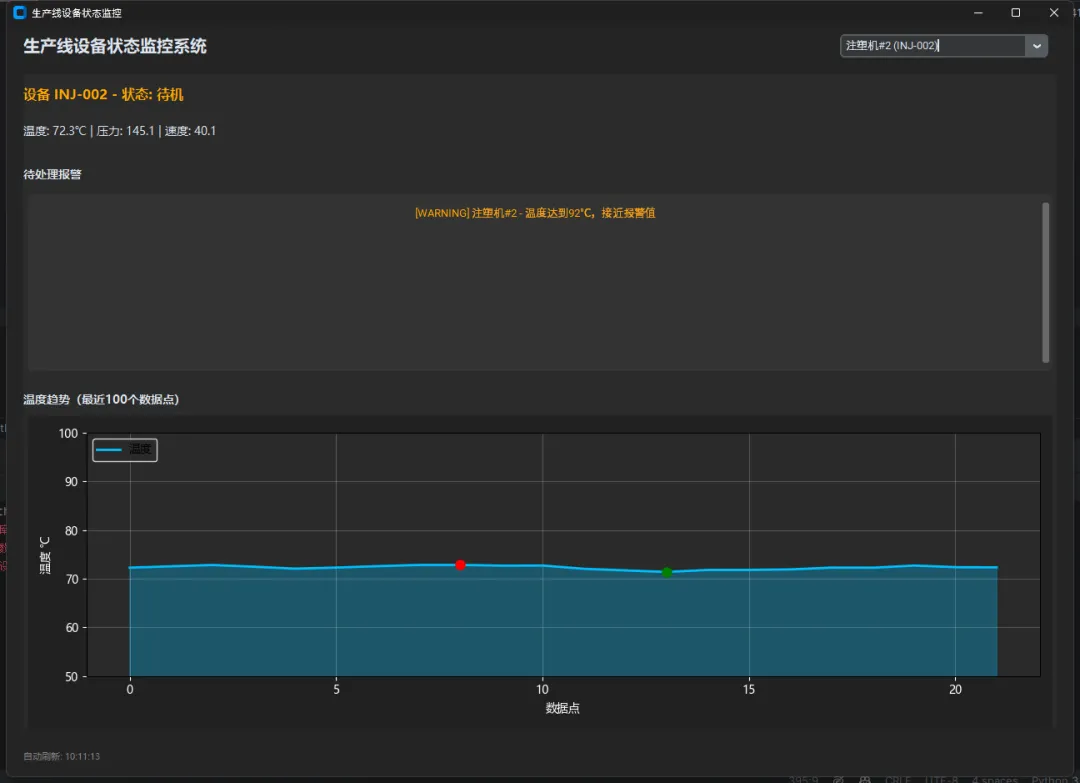
daemon=True这个参数别忘了设置——它保证主程序退出时后台线程自动结束,不会出现关了窗口程序还在后台跑的情况。
? 数据维护:别让数据库撑死
生产线24小时不停,每5秒采一次数据,一台设备一天就是17280条记录,10台设备一年下来……你算算。
原始数据不可能无限保留,需要定期清理。我的做法是保留最近30天的原始数据,更早的数据只保留日统计汇总:
python1def cleanup_old_data(self, keep_days: int = 30):
2"""清理超过keep_days天的原始状态数据"""
3from datetime import timedelta
4    cutoff = (datetime.now() - timedelta(days=keep_days)
5              ).strftime("%Y-%m-%dT%H:%M:%S")
6try:
7with self.get_cursor() as cursor:
8            cursor.execute("""
9                DELETE FROM device_status WHERE timestamp < ?
10            """, (cutoff,))
11            deleted = cursor.rowcount
12        logger.info(f"清理历史数据完成,删除 {deleted} 条记录")
13# 清理完顺手压缩一下数据库文件
14        conn = self._get_connection()
15        conn.execute("VACUUM")
16except Exception as e:
17 logger.error(f"清理数据失败: {e}")这个清理任务建议每天凌晨跑一次,用schedule库或者Windows任务计划都行。VACUUM操作会重建数据库文件回收空间,但比较耗时,放在清理之后、非业务高峰期执行。
? 几个实战踩坑提醒
坑一:timestamp精度问题。 如果采集频率很高(比如每秒多次),ISO格式到秒的精度不够,改用%Y-%m-%dT%H:%M:%S.%f包含微秒。
坑二:设备离线判断别靠状态字段。 有时候采集程序挂了,数据库里最后一条记录还是"running",但设备其实已经断联。正确做法是查最新记录的时间戳,超过阈值(比如30秒没数据)就判定为"通信中断",这个逻辑放在应用层,不要放在数据库里。
坑三:批量写入用executemany。 如果一次要写入多台设备的状态,别循环调execute,用executemany一次提交,性能差距在10倍以上。
python1# 低效写法
2for record in records:
3    cursor.execute("INSERT INTO device_status ...", record)
4
5# 高效写法
6cursor.executemany("INSERT INTO device_status ...", records)
? 写在最后
SQLite + CustomTkinter的组合,在工厂单机监控软件这个场景里,是个很务实的选择。不需要运维MySQL,不需要网络,程序打包成exe交付,现场工程师直接用。
本文涉及的完整代码已整理开源,包含数据库初始化脚本、完整的DeviceDatabase类,以及一个可运行的CustomTkinter演示界面,供学习参考。
设计思路比代码本身更重要。表结构为什么这样分、索引为什么建在这里、线程安全为什么这样处理——这些背后的"为什么",才是可以迁移到下一个项目的东西。
标签:PythonCustomTkinterSQLite工控软件设备监控
